


LivePhish
4.81.53K Reviews
App Specs
- Version
- 4.2.3
- Updated On
- License
- Free
- Downloads
- 100,000+
- Developer
- nugs.net
- Categories
- Music & Audio
- Platform
- Android
Screenshots
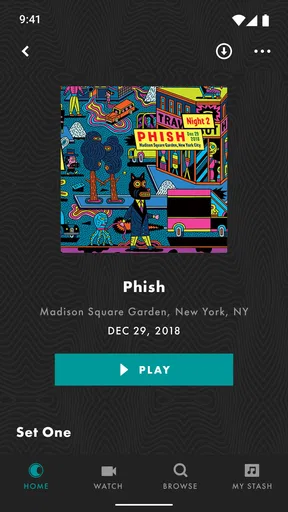
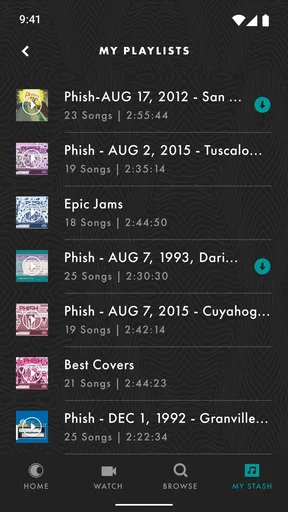
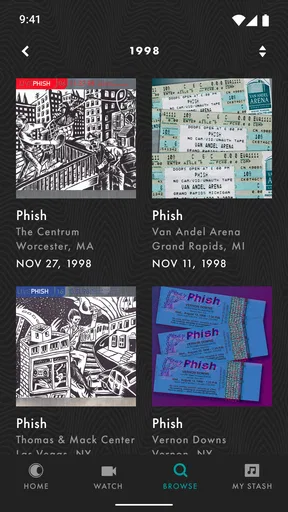
 Analysis by AppCompare
Ever find yourself yearning for a deeper dive into the world of live music? Well, I've got just the app for you. Let's talk about LivePhish, a must-have for any Phish fan or live music aficionado. You know that feeling when you're at a concert, and the energy is just electric? LivePhish captures that vibe right on your phone. Let me take you through my experience with it.
Who Will Get the Most from This Library?
I’d put this app first on the list for someone who already enjoys Phish’s changing setlists and likes revisiting particular performances. Its strength is depth within one band, rather than breadth across genres. If your listening usually moves between unrelated artists, a general music service will be more convenient; if you want to compare how a familiar song or set evolves from show to show, this focused archive makes more sense.
A practical way to explore is to start with a song or setlist you know, then look for other performances rather than choosing a concert at random. That turns a large catalogue into a manageable listening path: you can hear a song in different live contexts and decide which full show you want to spend time with. I’d also use playlists to keep a few discoveries together, instead of expecting to remember every date that caught my attention.
For a realistic weekday use, I might save a show while connected to Wi-Fi, then play it during a commute where mobile reception is unreliable. Downloading before leaving is the useful habit here: it avoids depending on a signal in the middle of a set and makes the app’s concert focus work well in an everyday routine, not just during a dedicated listening session.
What Makes LivePhish Stand Out?
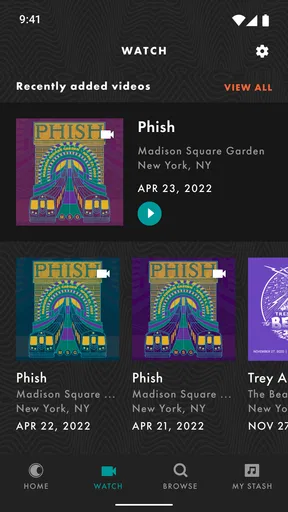
First off, let me tell you, this app is a goldmine for Phish fans. It offers a vast library of live Phish shows, available for streaming or download. What's cool is that it doesn’t just limit you to audio; you can find some incredible video footage as well. The app is like having a personal archive of Phish performances right in your pocket. I mean, who wouldn’t want that?
A Dive into the Features
One thing that struck me immediately is the app's clean and intuitive interface. Whether you're tech-savvy or just getting the hang of apps, you’ll find navigating through LivePhish a breeze. And trust me, I've seen a fair share of clunky apps in my day.
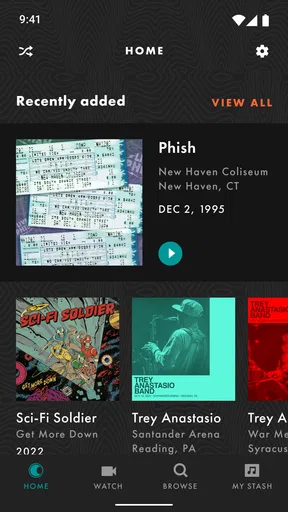
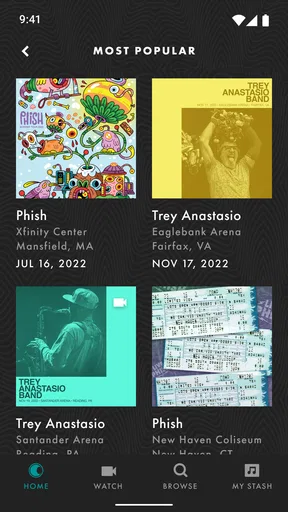
The main screen offers a selection of featured shows, new releases, and recommended concerts. It’s like having a personal DJ who knows exactly what you’re in the mood for. Plus, the search function is pretty robust. You can hunt down specific shows by date, tour, or even setlist. Talk about convenient!
Worth Reading Before You Choose

EA SPORTS FC Mobile 26 Is a Bigger Football Game, but It Takes Time

Flipboard Shows What News Apps Must Do Beyond the Feed

Switching to Android Auto Means Rethinking Your Driving Routine

Google Calendar Makes a Crowded Week Easier to Manage

Ludo King Makes the Most of the Minutes Between Plans

Baby Panda World Brings Quick Play to Modern Phones, but Its Game Library Feels Busy
Finding a Comfortable Way to Browse
For accessibility, the straightforward layout is a welcome starting point: searching by a detail you already know, such as a date or setlist, can be easier than paging through an open-ended catalogue. I’d approach recommendations as suggestions rather than the only route in. If you have a specific concert in mind, direct search is likely the more controlled workflow; if you are browsing casually, featured shows can help narrow the choice.
On a smaller screen or when attention is limited, it can help to decide what you want to hear before opening the app—one show, one song, or a short playlist. That reduces the amount of browsing and makes the listening session easier to resume mentally later. The trade-off is that a deep archive still asks the listener to make choices; a broad, automatically mixed music service may feel less demanding when you simply want background sound.
Sound Quality That Rocks
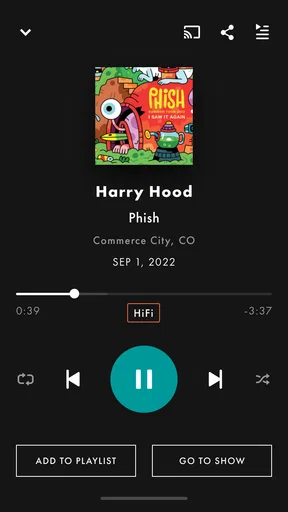
Now, let’s get to what matters most—the sound quality. I was floored by the crystal-clear audio. You can choose between standard or high-quality audio, depending on your connection or storage preferences. It’s almost as if you’re part of the crowd, swaying to the rhythm. If you’re like me and love the nuances in live recordings, this is a game-changer.
Choosing Audio for the Situation
The useful decision is not simply “best quality” versus “lesser quality”; it is whether the listening context justifies the extra data or storage. I’d choose the setting that fits the moment: a careful listen at home can reward more detail, while a commute or a limited connection is a sensible place to prioritize practicality. Live recordings also contain crowd sound and the natural variation of a performance, so anyone expecting a polished studio mix should adjust expectations rather than treating that character as a flaw.
For sensory comfort, volume and environment matter as much as the recording itself. A live show can have dense, shifting sound, and a long session may be tiring if you prefer quieter or more predictable audio. I would start at a comfortable level and choose a familiar performance before settling in for a full show. That advice is especially relevant when listening in shared spaces: headphones can make the experience more personal, but they also make it easier to lose track of surrounding sounds.
Offline Listening Made Easy
Another feature that had me hooked is the offline listening capability. You can download shows and listen to them wherever, whenever. Perfect for those long road trips or just chilling at home. And get this: the app even lets you create playlists of your favorite performances. So, if you’ve got a go-to setlist, you’re all set.
Planning Downloads and Longer Sessions
I’d treat downloads as a little bit of preparation rather than something to do at the last minute. Pick the show while you have a reliable connection, check that it is ready before heading out, and keep a playlist for the performances you want to return to. This is particularly useful for travel, places with patchy reception, or a routine where you do not want to browse while on the move. It also makes the choice of show more intentional: one full performance can be a satisfying listening session, while a playlist is better when you only have time for selected moments.
There is a storage trade-off with any downloaded concert collection. If space is tight, I would avoid saving every interesting show at once; download a small rotation, listen, then replace what you have finished. That simple workflow lets offline playback remain useful without turning the phone into a permanent archive. It is also worth remembering that downloading is most helpful when planned around your own schedule, not treated as a substitute for choosing what you actually want to hear.
Exclusive Content
Beyond the live shows, LivePhish offers exclusive content such as band commentary and behind-the-scenes footage. It’s like getting a backstage pass without the hefty price tag. I found myself getting lost in a rabbit hole of content, and honestly, I wasn’t complaining!
How It Fits Beside Other Music Apps
Compared with a general streaming service, this is a specialist choice: its appeal is the focused Phish catalogue and the context around performances, not a one-stop library for every artist or a hands-off soundtrack for any mood. I’d keep a broad music app for mixed-artist discovery and use this one when I want to spend time with the band’s live material. That distinction matters before paying for a subscription, particularly if you only listen to Phish occasionally.
The archive can also suit listeners who enjoy active exploration more than algorithmic discovery. Searching by show details and building a personal playlist puts more of the selection in your hands, which is rewarding when you know what you are looking for. The flip side is that someone who wants instant variety may find the narrow focus limiting, even if they appreciate live music in general.
Subscription and Pricing
Now, let’s talk about the moolah. The app offers a subscription model, and while it’s not free, the price is pretty reasonable for what you get. Think about it—unlimited access to a treasure trove of live music. If you’re a die-hard Phish fan, it’s a no-brainer.
The app itself is free to install, but ongoing access can involve in-app purchases, with listed options ranging from $9.99 to $199.99 per item. I would check the available plan and its terms in the app before committing, then judge the cost against how often I genuinely listen. A devoted fan who returns to shows regularly may find a focused subscription worthwhile; a curious newcomer might prefer to explore carefully before spending. The catalogue’s value depends less on how much content exists than on whether you will use this particular collection.
Compatibility and Performance
I’ve tested LivePhish on both Android and iOS, and it runs smoothly across platforms. No annoying lags or crashes here. It’s optimized well, ensuring a seamless experience whether you’re using a smartphone or a tablet. So, no worries about missing out, regardless of your device choice.
The current version is 4.1.17, and the Android requirement starts at version 9. The app is rated for Everyone, has a 4.8 average from around 4,000 ratings, and has passed 50,000 installs. Those figures suggest a well-established audience, but they cannot tell you whether its specialist catalogue matches your taste. It is published by nugs.net and has been available since September 12, 2011, so it is not a new experiment in live-music streaming.
Where It May Not Be the Right Fit
The main limitation is the same thing that makes the app distinctive: its focus. If I wanted a huge mix of artists, easy background playlists across genres, or a service centered on discovering unfamiliar music, I would reach for a broader alternative. Likewise, listeners who find long concerts difficult to navigate may prefer individual tracks and shorter, more varied sessions. Here, the appeal is spending time with performances as performances, rather than treating every song as an isolated item.
There is also a difference between being able to listen and being able to use every part comfortably. A clear-looking interface can help many people get started, but it does not guarantee that every browsing or playback task will suit every motor, visual, or sensory need. I would try the core workflow on your own device—find a show, start playback, and save something for later—before relying on it for a particular access requirement. For someone who needs a very specific interaction style, the simplest test is whether those everyday actions feel manageable in practice.
Final Thoughts
All in all, LivePhish is more than just an app; it’s an experience. Whether you’re a long-time Phish fan or new to their jams, this app is bound to enhance your musical journey. It’s got everything you need to feel the magic of live performances, right from the comfort of your home.
So, if you’re ready to dive into the world of Phish with me, head over to your app store and give LivePhish a download. Trust me, it’s worth every penny and more.
My Inclusive Verdict
I’d recommend it most to listeners who actively want Phish concerts, enjoy exploring setlists, and can make use of downloads or playlists in their routine. Its focused collection gives those fans a reason to return, while the search-led approach can make a deep catalogue less daunting once you have a starting point. The daily addition of shows also gives regular listeners a reason to check back without needing to treat every visit as a major browsing session.
For anyone weighing accessibility and convenience, I’d make the decision through a short, practical trial: search for a known performance, start playback, adjust your listening setup, and see whether saving a show fits your usual habits. That is more useful than assuming that a clean interface automatically removes every barrier. If the controls and long-form listening work for you, the app offers a distinctive way to stay close to Phish’s live performances; if not, a broader service or a different listening format may be the kinder choice for your needs.
Pros
- High-quality audio streaming.
- Extensive archive of live shows.
- User-friendly interface.
- Offline listening available.
- Real-time setlist updates.
Cons
- Subscription required for full access.
- Limited to Phish content only.
- Occasional streaming lags.
- App can be resource-heavy.
- No free trial available.
FAQs for LivePhish
What is LivePhish and what features does it offer?
LivePhish is a mobile app that provides access to live recordings of concerts by the band Phish. It offers a vast library of shows, high-quality audio streaming, and downloadable content. Users can also create and manage playlists, explore curated collections, and enjoy exclusive releases, making it a must-have for Phish fans.
Is the LivePhish app free to use, or is there a subscription fee?
The LivePhish app is free to download, but accessing its full range of features requires a subscription. The subscription offers unlimited streaming and downloads of available shows. There are different pricing tiers, and users can choose the one that best suits their listening habits. Some content might be available for purchase individually.
Can I use LivePhish offline, and how does the download feature work?
Yes, LivePhish allows offline listening through its download feature. Subscribers can download entire shows or individual tracks to their device, which are then accessible without an internet connection. This is particularly useful for those who want to enjoy music in areas with limited connectivity, like during travel.
What devices and operating systems support the LivePhish app?
LivePhish is available for both Android and iOS devices. It supports a wide range of smartphones and tablets that run on these operating systems. Users should ensure their devices meet the app’s minimum system requirements for optimal performance. Regular updates may also be required to access new features and improvements.
How does LivePhish ensure high-quality audio for its users?
LivePhish provides high-quality audio streaming and downloads, ensuring an excellent listening experience for fans. The app delivers lossless audio options for subscribers, allowing for crisp and clear sound. It prioritizes audio fidelity, making it a preferred choice for audiophiles and dedicated Phish enthusiasts.


